
How Inbox worksFrom customer email to founder-approved reply
No black box, approval-first by default. Here's exactly what happens between a customer hitting send and you tapping approve.

The pipeline
Six steps, strictly linear
Every message follows the same predictable path — easy to reason about, easy to trust.
Receive
A customer conversation lands from Gmail, ready for the V2 workspace.
Customer 360
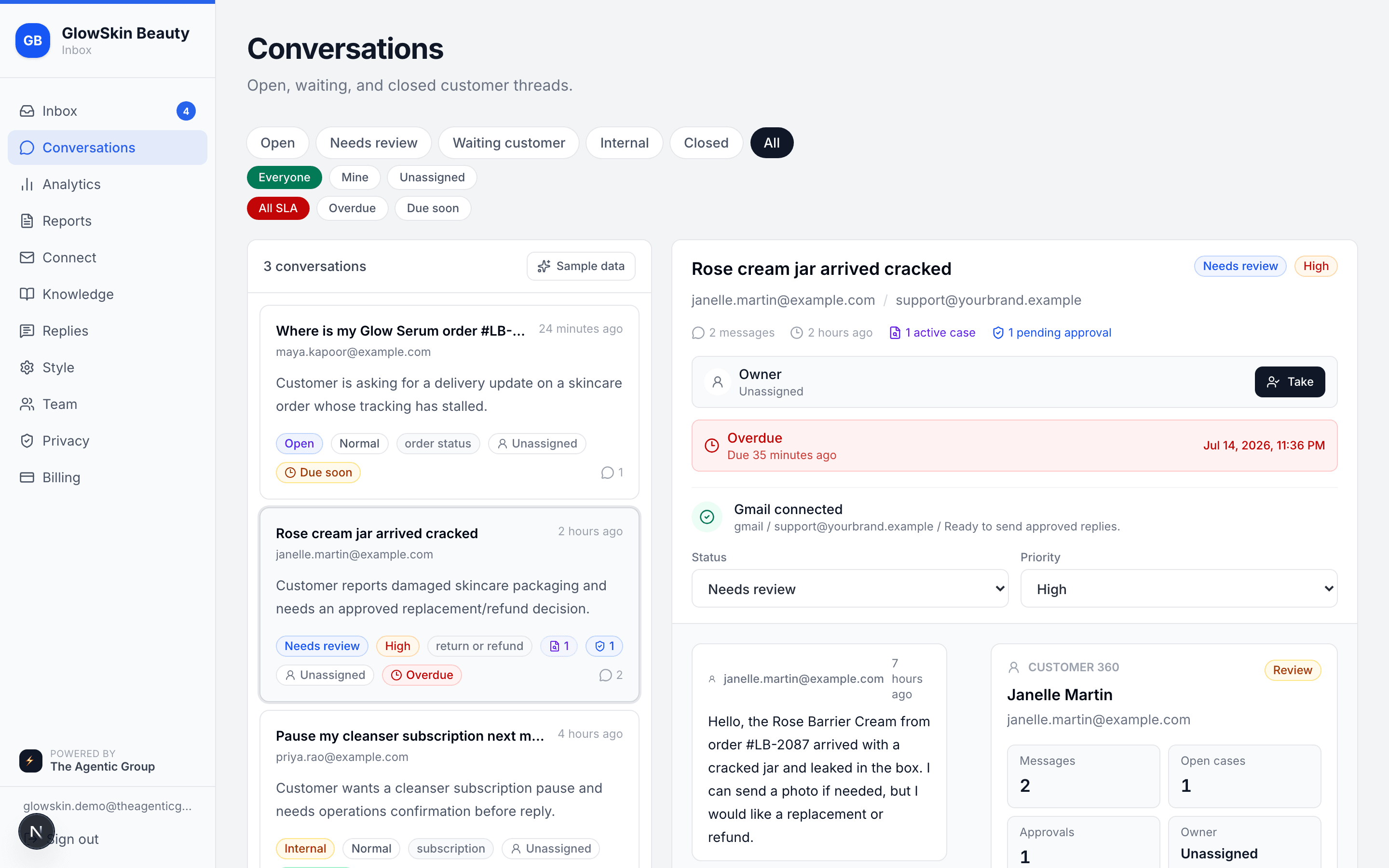
Inbox matches the customer, order, fulfillment, tags, cases, SLA, and history.
Ground
It retrieves Shopify facts and approved knowledge with citations before drafting.
Investigate
For refunds, damaged items, and exceptions, it creates evidence-backed cases.
Draft & validate
The AI prepares an on-brand reply, recommendation, or follow-up question and checks it before send.
Approve & audit
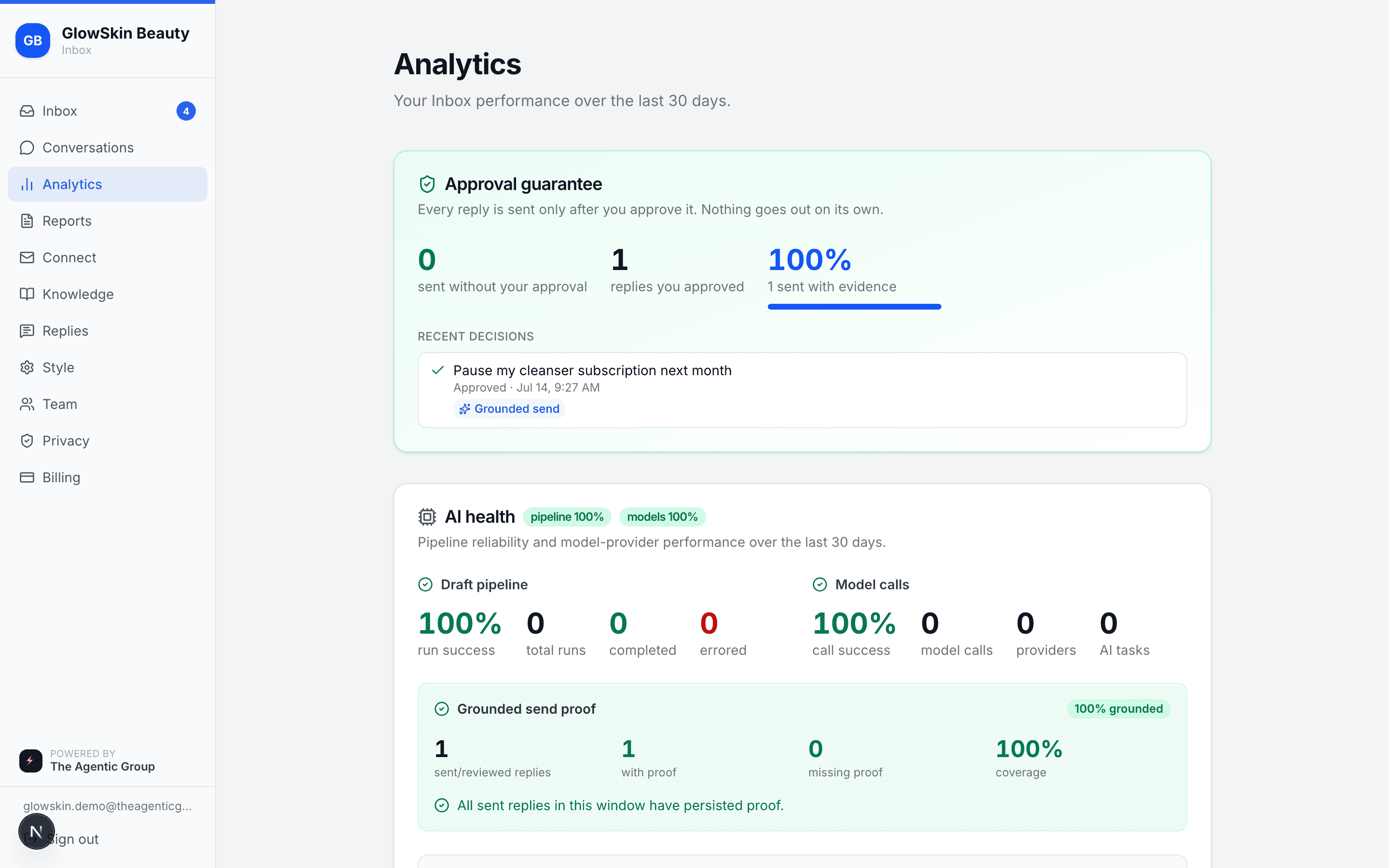
Humans approve sensitive decisions; every send keeps grounding proof in the audit log.
6 steps · strictly linear · no black box
The philosophy
Why approval-first?
Every AI tool that auto-sends saves time — until it says the wrong thing to the wrong customer. One hallucinated tracking number, one tone-deaf refund refusal, and you're managing a PR fire instead of growing your store. The approval gate costs you two seconds per reply and eliminates that risk entirely.
AI drafts
Groq classifies the intent, Gemini writes the reply in your brand voice, grounded in real order data from Shopify.
You approve
Every draft waits in your queue. Tap approve, edit inline, or reject. Public v1 keeps a human in the loop before every send.
Customer gets a great reply
The reply lands in the original Gmail thread within seconds of your tap. Logged, tracked, and auditable.
The safety gate
Every draft is checked before you ever see it
Before a reply reaches your queue, it's scanned for personal data, policy violations, and prompt-injection from untrusted customer input. Then you're the final check.
# Every draft is checked before a founder ever sees itdef validate_draft(draft, order): issues = [] if contains_pii(draft): # cards, SSNs, secrets issues.append("pii") if violates_policy(draft, tenant): issues.append("policy") if injection_detected(draft): # untrusted input issues.append("injection") return queue_for_approval(draft, issues)Your queue
Approve, edit, or reject — in seconds
The customer's message and the AI draft sit side by side. Good drafts approve with a tap; the rest you tweak inline.
Setup
Guided setup for first brands
- 1
Connect your Shopify store
Read-only OAuth access lets Inbox read orders, fulfillment, and tracking so drafts are accurate — it never writes to your store.
- 2
Connect Gmail
Gmail reads incoming support email into your queue and sends approved replies back in the original thread. Tokens are encrypted at rest.
- 3
Approve in one tap
Every reply waits in your queue. Approve, edit, or reject — from desktop or your phone. Nothing is ever sent automatically.

Security & trust
Safe with your store and your customers
Approval plus preflight
Sensitive sends, refunds, replacements, discounts, and policy exceptions wait for a human decision after grounding and recipient checks run.
Protected access
TOTP two-factor login is available, OAuth tokens are encrypted at rest, and secrets are never exposed to the browser.
Tenant isolation
Every brand's data is isolated at the database level with row-level security so queries cannot cross stores.
Untrusted customer input
Customer email, attachments, and order notes are treated as data, never instructions to the AI, to reduce prompt-injection risk.
AI health and evals
Model calls, success rates, grounded send proof, scenario gates, and repairable evidence gaps are visible in the analytics workspace.
Searchable audit proof
Approvals, edits, sends, actor IDs, grounding proof, and repair actions are reviewable from the audit log.

Bring every support decision into one workspace.
Inbox drafts with Shopify context, knowledge proof, preflight checks, and approval routing before anything reaches a customer.